
How antivirus software actually works
A plain-language explanation of signature matching, heuristics, behavioural monitoring, cloud reputation and exploit mitigation — and what each layer can and cannot catch.
This is a background explainer. It contains no partner links and nothing is being sold in it. The site as a whole is funded by affiliate commission — see the affiliate disclosure.
The name is forty years out of date
"Antivirus" describes a product that matched files against a list of known viruses. That product stopped being sufficient a long time ago, for a simple economic reason: recompiling and repacking a payload so that it produces a different fingerprint is cheap and automatable, while distributing an updated fingerprint list to millions of installations is not instant. An attacker who generates a fresh variant per target defeats signature matching entirely.
What replaced it is not one cleverer technique but several independent ones stacked in sequence, each catching a class of threat the others miss.
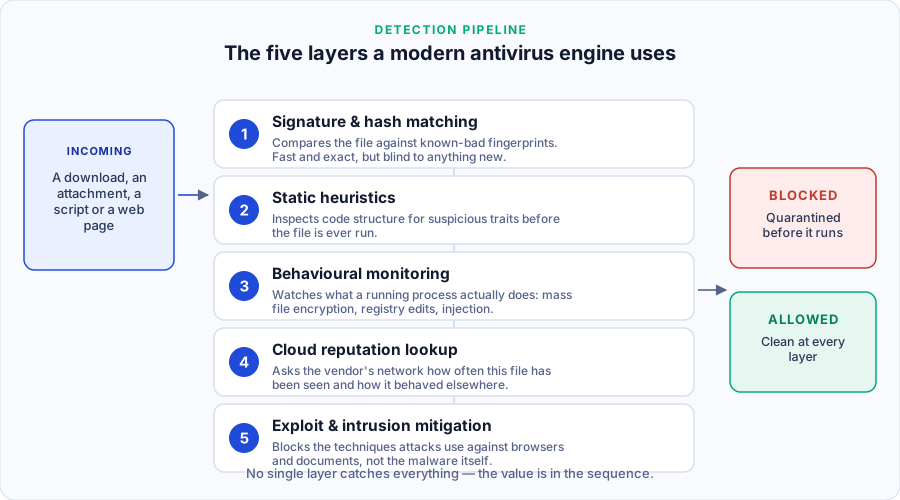
Layer 1 — signature and hash matching
A cryptographic hash of the file, or a pattern from inside it, is compared against a database of known-bad values. It is exact, extremely fast and produces almost no false positives, and it is blind to anything the vendor has not already catalogued.
It has not been abandoned, because it is nearly free to run and it disposes of the enormous volume of old, recycled malware still circulating. It is simply no longer the main event.
Layer 2 — static heuristics
Examining the file without running it. Is the executable packed or obfuscated in a way normal software is not? Does it import functions associated with keylogging or process injection? Is this a spreadsheet containing a macro that contacts a web address? None of these is proof of anything individually — legitimate software is sometimes packed, and macros are sometimes legitimate — so the engine scores the combination.
This is the layer responsible for most false positives, which is why an unsigned utility you wrote yourself sometimes gets quarantined.
Layer 3 — behavioural monitoring
The most important layer, and the hardest to evade. Instead of asking what a file looks like, it watches what a process does once it is running: opening and rewriting hundreds of documents in sequence, deleting volume shadow copies, injecting code into another process, adding itself to startup, disabling recovery options.
The power of this approach is that it is indifferent to novelty. A ransomware family released an hour ago, that no laboratory has ever seen, still has to encrypt files to earn money — and encrypting files at speed looks exactly like encrypting files at speed. The behaviour is the signature.
Its weakness is timing. Behavioural detection necessarily means the process has begun to execute, so the engine must decide quickly and will usually roll back what it can. Some damage before the stop is possible.
Layer 4 — cloud reputation
The engine asks the vendor’s network what it knows about this exact file: how many installations worldwide have seen it, when it was first observed, whether it is digitally signed and by whom, and how it behaved elsewhere. A binary first seen four minutes ago on three machines is treated with suspicion that the same engine would never apply to a signed file present on twenty million machines for three years.
Two things follow. First, this is why a brand-new, perfectly legitimate program from a small developer sometimes gets flagged: it has no reputation yet. Second, this is the layer with real privacy implications — it means metadata about files on your machine is sent to the vendor. Every major vendor does this and documents it in its privacy notice, and those notices are worth reading before you choose one.
Layer 5 — exploit mitigation
This layer does not look at files at all. It watches for the techniques used to gain execution through a flaw in legitimate software — a browser, a PDF reader, an office application — such as code executing from a region of memory that should only ever hold data.
Exploit mitigation is often described, including in marketing copy, as "patching" the vulnerable software. It does not patch anything. It blocks the technique at runtime while the flaw remains present. Only an update from the software’s own vendor fixes the flaw. This is why security software complements automatic updates and never replaces them.
What no layer can do
It is as important to know where the model ends.
- Correct credentials. If somebody signs in to your account with your real password, obtained from an unrelated breach, no scanner on your laptop is involved. That is what password managers and two-factor authentication address.
- You, deliberately. If you are persuaded to install a remote-access tool because a caller claims to be from your bank, the software may well warn you — and you will click through the warning, because you have been convinced.
- Unpatched software. Mitigation buys time against exploitation; it does not close the hole.
- Data already sent. Nothing recalls information typed into a convincing fake login page.
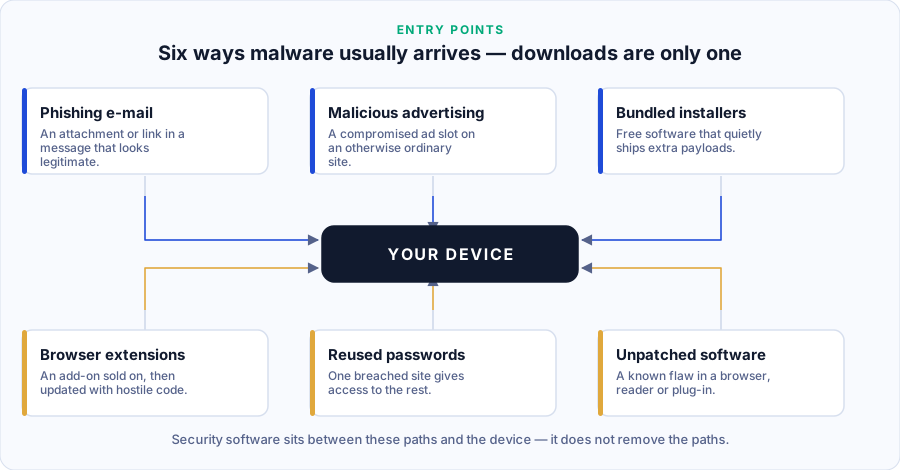
What this means when you compare products
- Treat "AI-powered detection" as a description of layers 2 to 4, which every serious vendor has had for years. It is not a differentiator.
- The false-positive rate matters as much as the detection rate. A product that cries wolf trains you to dismiss it.
- Ask what happens after a detection: is there a rollback, a quarantine you can inspect, a way to recover a file it took by mistake?
- The engine is usually identical across a vendor’s consumer tiers. The upper tiers sell services, not better scanning.
Sources
- AV-Comparatives — test methodology documents describing how real-world and behavioural tests are constructed.
- AV-TEST — consumer Windows results and scoring categories.
- Microsoft — Defender Antivirus documentation, a publicly documented example of cloud-assisted protection and behavioural monitoring.
- ENISA — Threat Landscape, for the prevalence of the delivery routes described above.